
Angular 17 vs Angular 19: What’s New and Why It Matters
Angular continues to evolve rapidly, and with each release, it brings improvements that make development faster, cleaner, and more efficient. Two of the most important recent versions—Angular 17 and Angular 19—highlight this transformation clearly.
If you're a developer, student, or business owner planning to build modern web applications, understanding the difference between these versions can help you make the right decision.
???? Introduction
Angular 17 focused heavily on improving developer experience with cleaner syntax and better tooling. Angular 19, on the other hand, takes things further by focusing on performance, modern architecture, and advanced reactivity.
In simple terms:
Angular 17 = Better developer experience
Angular 19 = Better performance + future-ready architecture
???? Key Features of Angular 17
Angular 17 introduced several improvements that made coding simpler and more readable.
1. New Control Flow Syntax
Angular introduced a modern way to write conditions and loops directly in templates:
`@if`
`@for`
`@switch`
This replaces older, more complex structural directives and makes templates easier to understand.
2. Deferrable Views (`@defer`)
This feature allows developers to load parts of the UI only when needed, improving performance and reducing initial load time.
3. Improved Server-Side Rendering (SSR)
Angular 17 made SSR more stable and efficient, helping with SEO and faster page loads.
4. Standalone Components (Encouraged)
While introduced earlier, Angular 17 strongly promoted standalone components to reduce dependency on NgModules.
5. Faster Build System
With tools like Vite and esbuild, Angular 17 significantly improved build speed.
⚡ Key Features of Angular 19
Angular 19 builds on Angular 17 and focuses more on performance, scalability, and modern reactive programming.
1. Standalone Components as Default
Angular 19 removes the need for NgModules in most cases, making applications simpler and easier to manage.
2. Advanced Signals (Reactivity System)
Signals become more powerful, enabling better state management and reducing reliance on RxJS for many use cases.
3. Incremental Hydration
This allows only parts of the page to become interactive when needed, improving performance and user experience.
4. Event Replay (Stable)
User interactions are preserved during page loading, ensuring a smoother experience in SSR applications.
5. Route-Level Rendering Control
Developers can now decide how each route should render:
Server-side (SSR)
Client-side (CSR)
Pre-rendered
6. Improved SEO & Performance
Angular 19 significantly boosts performance, making it ideal for large-scale and SEO-focused applications.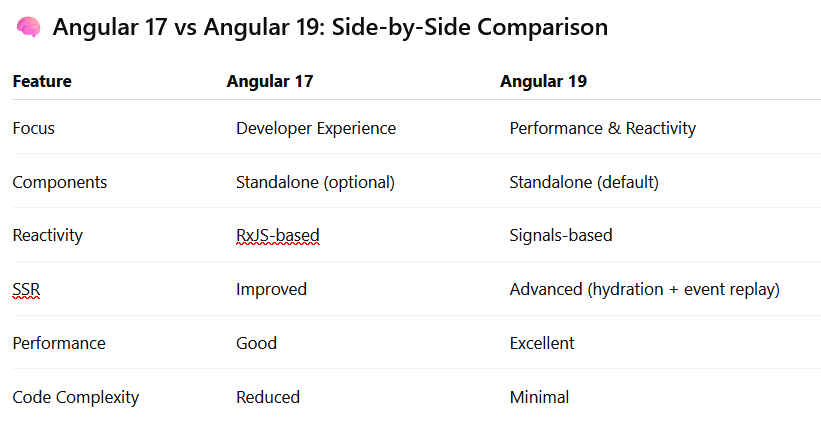
????️ Real-World Use Cases
When to Use Angular 17
You are working on an existing project
You want stable and well-documented features
You are learning Angular basics
When to Use Angular 19
* You are starting a new project
* You want better performance and scalability
* SEO and fast loading are priorities
* You want to use modern Angular architecture
???? Performance Comparison
Angular 19 clearly outperforms Angular 17 due to:
* Incremental hydration
* Better rendering control
* Reduced unnecessary JavaScript
* Improved reactivity using signals
This results in faster load times and smoother user interactions.
???????? Developer Experience
Angular 17 made development easier. Angular 19 makes it even simpler:
* Less boilerplate code
* Cleaner structure
* Easier debugging
* Faster development cycles
Final Verdict
Both versions are powerful, but they serve slightly different purposes.
Choose Angular 17** if you are maintaining or learning
Choose Angular 19** if you want performance, scalability, and future-ready apps
???? Conclusion
Angular is clearly moving towards a more modern, reactive, and performance-focused future. Angular 17 laid the foundation, and Angular 19 builds on it with powerful enhancements.
If you're planning a new project today, Angular 19 is the smarter choice.